
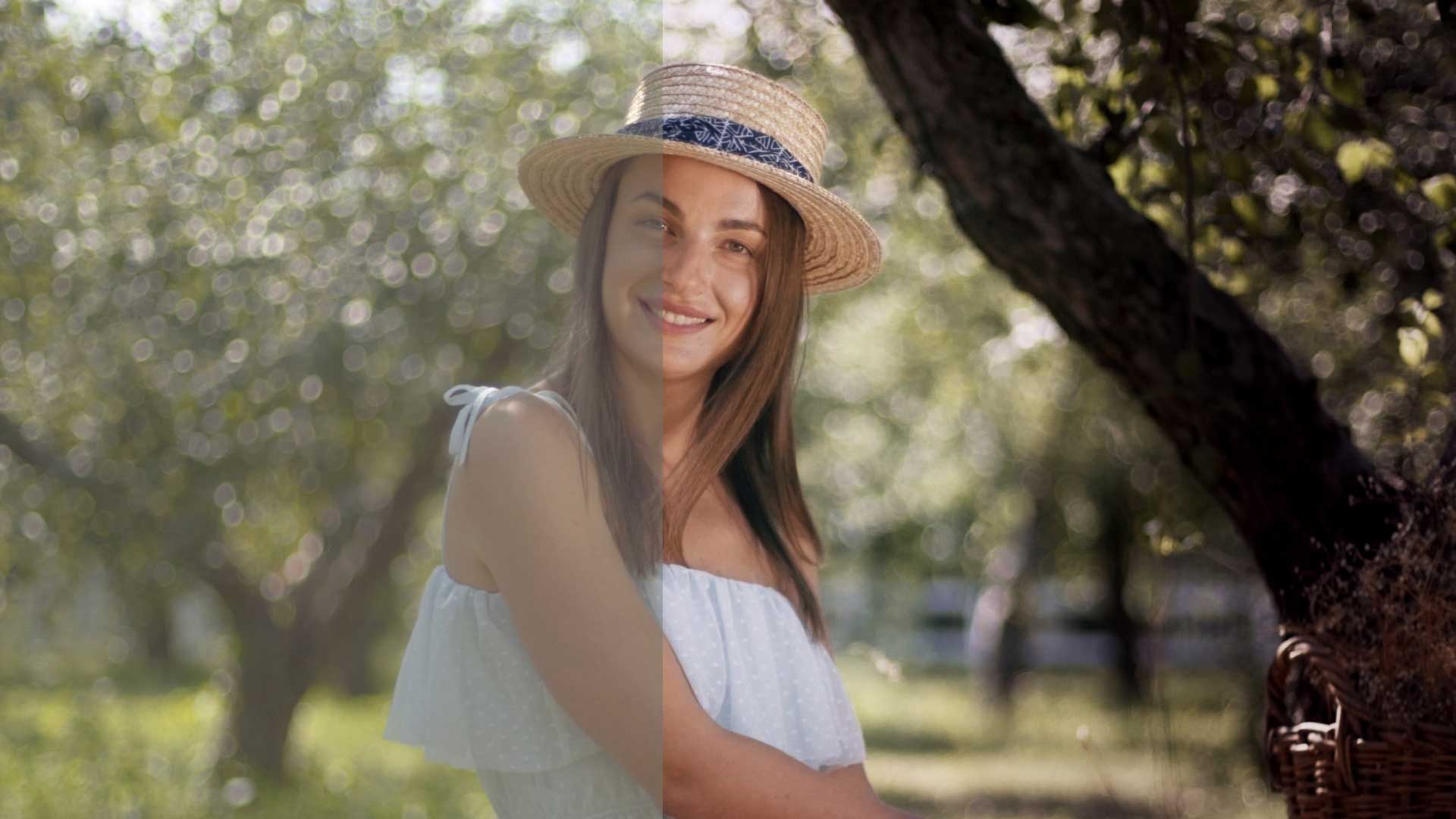
AI Color Grading in DaVinci Resolve: How AI Is Changing Professional Color Grading
Color grading has always been one of the most important stages of professional video post-production. It is where raw footage becomes cinematic, emotional, polished, and brand-ready.
Today, AI color grading is changing how creators, editors, and colorists approach the finishing process. But AI is not replacing professional color grading. Instead, it is becoming a powerful assistant that helps speed up research, reference analysis, shot matching, visual planning, and creative decision-making.
For professional color grading in DaVinci Resolve, this creates a major opportunity. AI can help analyze visual references, identify color tone, understand contrast direction, and support look development. But the final creative judgment still depends on the colorist’s eye, taste, experience, and understanding of storytelling.
In this blog, we will explore how AI color grading is changing DaVinci Resolve color grading workflows, how it supports advanced color grading, and why human creative control is still essential.
What Is AI Color Grading?
AI color grading refers to the use of artificial intelligence tools, machine learning, and intelligent visual analysis to support the color grading process.
This can include automatic color correction, shot matching, reference image analysis, face detection, object detection, skin tone support, smart masking, scene balancing, visual mood analysis, and look development support.
In a professional workflow, AI color grading is not only about pressing one button and getting a final look. It is about using AI to reduce repetitive tasks and support better creative decisions.
For example, AI can help identify whether a reference image has warm highlights, cool shadows, soft contrast, crushed blacks, muted saturation, film-style color separation, natural skin tone, teal and orange balance, green-biased shadows, or high-key commercial lighting.
This type of analysis can help a colorist build a better starting point inside DaVinci Resolve.
Why DaVinci Resolve Color Grading Is Important?
DaVinci Resolve color grading is widely used in professional post-production because it gives colorists deep creative control.
Its workflow is built around primary color correction, custom curves, qualifiers, Power Windows, tracking, node-based grading, HDR grading tools, scopes, color management, skin tone control, secondary corrections, and shot matching.
The biggest strength of DaVinci Resolve is control. A professional colorist can build a complete grade step by step instead of depending only on a single preset or LUT.
This is why DaVinci Resolve color grading is one of the strongest choices for commercials, social media videos, brand films, music videos, corporate videos, documentaries, and cinematic content.
How AI Supports the DaVinci Resolve Color Grading Workflow
AI can support different stages of a professional DaVinci Resolve color grading workflow. It can help in the planning stage, technical correction stage, look development stage, and finishing stage.
However, AI should be treated as an assistant, not as the final decision maker. A strong grade still needs creative direction, visual judgment, and human control.
Here is a related color grading workflow example from my YouTube channel, showing how visual tone, contrast, and cinematic color decisions can shape the final look of a video.
1. Reference Analysis
Before grading, many projects start with a visual reference.
A client may share a film still, advertisement, music video, commercial, or moodboard. AI can help break down that reference more clearly.
It can help identify exposure direction, black level, highlight softness, shadow color, midtone balance, saturation level, skin tone direction, color contrast, cinematic mood, and overall palette.
This helps the colorist understand what needs to be recreated inside DaVinci Resolve.
But AI should not be treated as the final judge. It can describe the look, but the colorist must decide how far to push the image.
2. Faster Shot Matching
Shot matching is one of the most time-consuming parts of professional color grading.
In this video, you can see how shot matching and color consistency play an important role in creating a polished final look. Even when footage looks different because of lighting, exposure, or camera settings, a structured color grading workflow helps bring everything into the same visual direction.
In a real project, footage may come from different cameras, different lighting conditions, different locations, different exposure levels, different white balance settings, and different lenses.
AI tools can support the shot matching process by helping compare color, contrast, brightness, and scene balance.
Inside DaVinci Resolve, this can help the colorist work faster when building a consistent visual flow across the full video.
However, professional shot matching still requires human control. AI may balance a shot technically, but it may not understand the emotional purpose of the scene.
3. Smarter Masking and Subject Isolation
Modern color grading often requires selective adjustments.
For example, a colorist may need to brighten a face, protect skin tone, darken the background, enhance product color, cool down shadows, warm up highlights, isolate the sky, or separate the subject from the environment.
AI-assisted masking and detection can make this process faster. Instead of manually creating complex selections for every frame, AI can help identify subjects, faces, objects, and areas of the image.
This is especially useful for social media reels, brand videos, product films, interview videos, fashion content, beauty content, AI-generated videos, and commercial edits.
But masking is only the starting point. A professional colorist still needs to refine the result so it feels natural, cinematic, and aligned with the visual direction.
4. Better Skin Tone Protection
Skin tone is one of the most sensitive parts of professional color grading.
A video can have a strong cinematic look, but if the skin tone looks unnatural, the entire grade may feel wrong.
AI can help detect faces and support skin-related adjustments. But professional color grading still requires careful manual control of hue, saturation, luminance, contrast, warmth, texture, exposure, and color separation.
In DaVinci Resolve, skin tone is often refined using qualifiers, curves, windows, scopes, and secondary correction nodes.
This is where experience matters. A good colorist knows when to protect skin tone and when to stylize the image without making people look unnatural.
5. Creative Look Development
AI color grading can also support creative look development.
For example, it can help suggest whether a scene may benefit from a warm commercial look, cool cinematic look, soft natural grade, high contrast film look, clean corporate tone, muted documentary look, premium product tone, or dramatic low-key contrast.
This can be useful in the early creative stage.
But the final look should always be created with intention. A professional grade is not only about color. It is about mood, story, brand identity, audience, platform, and emotional response.
Why AI Cannot Replace Professional Color Grading
AI can speed up the workflow, but it cannot fully replace professional color grading.
The reason is simple: color grading is not only technical. It is creative.
A professional colorist understands what the brand should feel like, how the audience should respond, how skin tone should look, how to maintain product accuracy, how to control visual hierarchy, how to guide the viewer’s eye, how to create emotional tone, and how to maintain consistency across a full project.
AI can suggest a look, but it does not fully understand brand positioning, cultural context, storytelling, or client expectations.
For example, a product video may need the exact product color to remain accurate. A food commercial may need warmth and appetite appeal. A corporate video may need clean, trustworthy tones. A fashion film may need stylized contrast and mood.
These decisions require creative judgment.
AI Color Grading for AI-Generated Videos
AI-generated videos often need professional color finishing.
Even when an AI video looks impressive, it may still have problems such as inconsistent color between shots, unnatural skin tone, mismatched lighting, over processed contrast, strange saturation, artificial sharpness, low realism, and inconsistent mood.
This is where DaVinci Resolve color grading becomes very useful.
A professional color grading workflow can help AI-generated videos look more consistent, cinematic, and production-ready.
For AI video production, color grading can improve realism, mood, visual continuity, brand consistency, cinematic quality, platform readiness, and final polish.
This is especially important for brands, agencies, and startups using AI videos for campaigns, social media, product launches, or digital ads.
Advanced Color Grading Principles Still Matter
Even with AI support, the fundamentals of advanced color grading remain important.
A strong professional grade depends on exposure balance, contrast control, color temperature, skin tone accuracy, color separation, saturation control, highlight roll-off, and consistency.
Exposure Balance
The first step is making sure the image has proper brightness, shadow detail, highlight control, and readable midtones.
Without proper exposure balance, the grade can feel either too flat, too harsh, or too unnatural.
Contrast Control
Contrast creates depth, mood, and visual impact.
Too much contrast can crush details. Too little contrast can make the image feel flat. A professional grade uses contrast carefully to guide the viewer’s attention and support the mood of the scene.
Color Temperature
Warm or cool balance affects the emotional tone of the footage.
Warm tones can feel friendly, energetic, nostalgic, or commercial. Cool tones can feel modern, dramatic, calm, or cinematic. The right temperature depends on the message and mood of the project.
Skin Tone Accuracy
Skin tone should look natural unless the creative direction intentionally requires stylization.
Even in a cinematic grade, skin tone needs careful control so people still look believable and visually pleasing.
Color Separation
A cinematic grade often separates subject and background through controlled color contrast.
This can help create depth, focus, and a more premium visual feel. Good color separation makes the subject stand out without making the image look artificial.
Saturation Control
Professional grading is not about adding too much saturation.
It is about controlling where saturation should appear. Sometimes a less saturated image can feel more cinematic, while selective saturation can help highlight a product, face, or key visual element.
Highlight Roll-Off
Soft, controlled highlights help create a more premium and cinematic image.
Harsh highlights can make footage feel digital or unfinished. Controlled highlight roll-off helps the image feel smoother and more polished.
Consistency
Every shot must feel like it belongs to the same visual world.
This is especially important for commercials, social media campaigns, brand films, and AI-generated video sequences where different shots may have different lighting or color behavior.
My Approach to AI-Assisted Professional Color Grading
My approach combines traditional DaVinci Resolve color grading principles with AI-assisted analysis.
The process usually includes understanding the project goal, studying the visual reference, analyzing the footage, building a clean correction base, balancing exposure and white balance, creating contrast and depth, protecting skin tone, developing the creative look, matching shots, adding final polish, and preparing the video for delivery.
AI can support the analysis and planning stage, but the final grade is always shaped manually through creative judgment.
This balance is important. The goal is not to make the video look artificially processed. The goal is to make it feel polished, cinematic, natural, and aligned with the brand.
Why Brands Should Care About Professional Color Grading
- For brands, color grading is not only a technical post-production step.
- It affects how the audience feels about the content.
- Professional color grading can make a video feel premium, trustworthy, cinematic, emotional, modern, consistent, brand-focused, and visually memorable.
- For social media, color grading helps content stand out in crowded feeds.
- For brand films, it creates mood and identity.
- For product videos, it enhances quality and appeal.
- For AI-generated videos, it adds realism and finishing.
- For agencies and startups, it can make content look more professional without always requiring a large-scale production budget.
Final Thoughts
AI color grading is changing professional color grading, but it is not removing the need for skilled colorists. Instead, AI is becoming a powerful creative assistant.
It can help with analysis, automation, organization, shot matching, and workflow speed. But professional color grading still depends on human taste, storytelling, brand understanding, and visual control.
DaVinci Resolve remains one of the most powerful tools for advanced color grading because it gives colorists the control needed to shape every part of the image.
The future of color grading is not AI versus humans. It is AI-assisted creativity guided by professional human judgment.
Frequently Asked Questions
What is AI color grading?
AI color grading uses artificial intelligence to support color correction, shot matching, reference analysis, masking, and look development. It helps speed up the workflow but still requires professional creative control.
Can AI replace professional color grading?
No. AI can assist with technical and repetitive tasks, but professional color grading still needs human judgment, storytelling, skin tone control, brand understanding, and creative taste.
Is DaVinci Resolve good for advanced color grading?
Yes. DaVinci Resolve is one of the strongest tools for advanced color grading because it offers node-based grading, scopes, qualifiers, Power Windows, HDR tools, color management, and deep creative control.
How does AI help in DaVinci Resolve color grading?
AI can support color grading by helping with auto color, color matching, smart masking, facial detection, object detection, and workflow speed. The final grade still depends on the colorist.
Do AI-generated videos need color grading?
Yes. AI-generated videos often need professional color grading to improve realism, consistency, contrast, skin tone, lighting balance, and cinematic quality.
Need professional color grading for your brand video, social media content, AI-generated video, or commercial project?
Explore my Color Grading & Finishing services or contact Hasib Nur to create a polished, cinematic, and brand-ready final look for your video.